


Let’s assume a company runs a 30-year-old ERP system written in Visual Basic. The source code no longer exists.
Anyone who wants to replace a system like this has two tasks: understand the existing behavior and build a new system. AI can speed up both. The result is a system that AI applications can later connect to as well. This guide shows how AI-powered legacy modernization works, which five phases it goes through, where AI reaches its limits and how you can check in five minutes whether your system is ready. First, let’s briefly clarify a few basic definitions.
What is legacy modernization?
Legacy modernization means moving a system that has grown over many years onto a modern technical foundation while keeping its business functionality intact. In AI-powered legacy modernization, AI analyzes the legacy code, documents its behavior and builds new modules. What matters is that people always review the results.
Experts distinguish between five approaches:
- Rehosting: The application runs unchanged on new infrastructure.
- Replatforming: Parts of the application are adapted to a new platform.
- Refactoring: The code is restructured, the functionality stays the same.
- Rebuild: The application is rebuilt on a new technology stack.
- Retirement: The system is switched off because it is no longer needed.
Which approach fits depends on the business goal, the appetite for risk and the state of the code. When modernizing legacy systems, Riwers usually opts for a rebuild, with a 1:1 copy as the first goal: the same functionality on new technology.
What does software migration mean?
Software migration means transferring an application and its data to a new technical foundation, for example from an old framework to a current stack. It is therefore one part of software modernization. Riwers keeps migration and further development separate: first the copy is built on the new technology, then come optimizations and new features.
Why legacy systems are under pressure now
Legacy systems often cause ongoing costs and risks that are hard to quantify. Nevertheless, we have gathered a few figures for orientation:
- According to a 2026 HCLTech study, 51% of enterprise applications are considered legacy (HCLTech).
- In a 2025 Lünendonk study, 62% of the companies surveyed said parts of their business-critical applications are no longer fit for purpose. 97% cite rising security and regulatory requirements as a driver (Lünendonk).
- According to Bitkom, Germany is currently short of 79,000 IT specialists who could look after systems like these (Bitkom).
The dual benefit: replace legacy and become AI-ready at the same time
These figures explain why legacy systems cost money and nerves. For many companies, there is now a second reason: they want to use AI and realize that their systems were not built for it.
This is where the idea we call the dual benefit comes in. If you plan the replacement of a legacy system and the preparation for AI separately, you analyze the same system twice. The dual-benefit approach to AI-powered legacy modernization combines both: the work that is needed anyway to understand the old behavior and rebuild it also lays the foundation that AI applications can later build on.
Why AI projects fail on legacy systems
How wide the gap between legacy systems and AI is becomes clear in a 2026 HCLTech study: only 21% of companies consider their data estate modernized and operational (HCLTech). One reason lies in the software itself. Custom software that has grown over the years is often poorly documented and hard to keep track of (it-daily). If you put an AI application on top of such data and interfaces, it inherits every ambiguity hidden in the legacy system.
What “AI-ready” actually means
So what needs to be in place for a system to be AI-ready? In our view, three things:
- Documented interfaces and data models that applications can connect to.
- Business logic that can be verified, because it exists as a specification with test cases.
- Automated tests that prove the system behaves as described.
If you compare this list with the results of a clean modernization, you will find a lot of overlap. Analysis and rebuild produce module maps, dependency graphs, interface and data model documentation, feature specifications and acceptance tests anyway. That is the dual benefit. Which AI solutions for your company you then build on top depends on the use case; AI consulting can help with the selection.
How AI helps with modernization, and where it doesn’t
Where AI helps
That leaves the question of what role AI itself plays in this process. Its greatest strength lies in understanding: AI agents can analyze code, make dependencies visible and create documentation (it-daily). Many companies expect exactly that. In the Lünendonk study, 69% of respondents expect a better understanding of existing program structures, and 55% see potential in documentation and knowledge management.
During the rebuild, AI then writes the modules and developers review them. You can read how this is changing the work of development teams in our article on AI in software development.
How much time this saves is hard to say in general terms. Vendors advertise big numbers; Fujitsu, for example, claims migration times around 40% shorter for its AI modernization service (Fujitsu). Vendor figures like these, however, cannot simply be transferred to other projects.
Where AI has limits
As helpful as AI is for understanding and building, its limits become just as clear once you leave too much to it. Gartner expects more than 70% of mainframe exit projects started in 2026 to miss their goals. As the reason, Gartner cites an overestimation of what generative AI tools can do (Gartner). Slalom also stresses that AI results need human oversight and that a pure cloud migration usually does not solve the problems of software that has grown over time (it-daily).
For us at Riwers, this means: every statement about the legacy system must be backed by the code. Our method puts it like this: “Nothing is assumed, everything is backed by code.”
The five phases of AI-powered legacy modernization
What does this look like in practice? Our legacy migration runs in five phases that build on each other:
- Understand: First, an AI analysis captures the codebase with its architecture, business rules, dependencies and data flows. We also evaluate the Git history and observe the running system.
- Analyze: Next, we assess the code, risk areas, maintenance effort and hidden dependencies.
- Specify: On this basis, we record the behavior of the legacy system as a specification with test cases.
- Rebuild: Only now does AI build the new system, and our senior engineers review every module. The rebuild happens step by step, without a big bang.
- Verify: Finally, automated tests prove that the new system behaves identically.
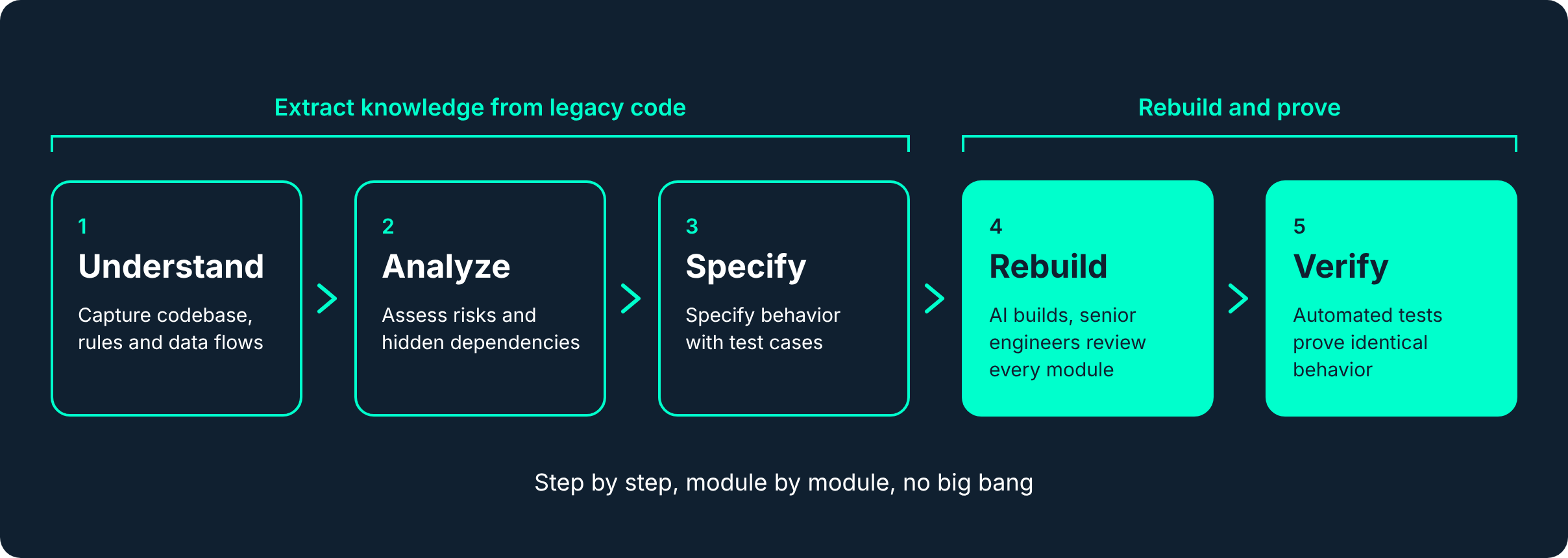
The first three phases serve one main purpose: getting the knowledge out of the legacy code before development on the new stack begins. We deliberately save optimizations, new features and larger fixes for later, once the 1:1 copy is in place. That way, it is always clear what has changed.
Three examples from practice
Three of our projects show how different the starting points can be:
| Client | Starting point | Approach | Result |
|---|---|---|---|
| Löwenfels | jQuery frontend with around 60 server-side RPC scripts | Interface rebuilt in Angular, the document system left untouched | Seven working days instead of three to four months |
| dormakaba (B-COMM) | Java RMI monolith with a Swing interface, no repository | Behavior captured on the running system, interface replaced with React | Old and new systems run in parallel |
| ERP project (client anonymous) | 30-year-old ERP in Visual Basic, no source code | Reconstruction from server snapshots, migration to Odoo module by module | First module live, the legacy system keeps running in parallel |
The ERP project was a special case, because there was no source code left. The system was reconstructed from server snapshots and is now being moved to Odoo module by module. If you are facing an ERP change yourself, our article on ERP alternatives for SMEs compares the options.
Is your system ready? The prerequisites
At this point, you may be wondering whether your own system is a candidate for this approach. Before an analysis can start, three prerequisites need to be clarified: the source code, a test system and the acceptance process.
How much effort the project then involves depends on six factors: the size of the system, the data history, the core logic, the scope of the modernization, the interfaces and operations. Then, of course, there are deadlines and budget.
That sounds like a lot of variables, but it can be assessed quickly.
That is why we developed the Legacy Check. You answer ten questions without any preparation, which takes about five minutes. You then see which prerequisites are met and which are still missing. Once you have confirmed your email address, you receive the assessment as a PDF report including an effort profile. If you like, we can then discuss the result in a free, no-obligation 30-minute call.
Costs, duration and risks
And then, of course, there is the question of cost and duration. Unfortunately, fixed prices for AI-powered legacy modernization cannot be given without knowing your system. Industry figures help for orientation: according to HCLTech, a typical modernization project takes around 39.5 weeks. In a model calculation, HCLTech puts the labor costs for this at around 807,000 US dollars (HCLTech). How far your project deviates from this depends on the factors just mentioned.
So that you don’t have to start with a shot in the dark, every project with us begins with an analysis of the code or the running system. It takes up to one week and runs in isolation and under NDA. You receive the report in any case, and it belongs to you, even if someone else takes over the implementation later. Based on it, we prepare a fixed-price offer with no open end.
Risks can be limited in the same way. Because we rebuild step by step, there is no big bang. Old and new systems run in parallel for a while, as with dormakaba and the ERP project, so day-to-day operations continue. Quality is ensured by our senior engineers reviewing every module.
Frequently asked questions about legacy modernization
What is legacy modernization?
Legacy modernization is the transfer of a system that has grown over many years onto a modern technical foundation while keeping its business functionality intact. It includes rehosting, replatforming, refactoring, rebuild and switching off systems that are no longer needed.
What does software migration mean?
Software migration transfers an application and its data to a new technical foundation. It is one part of modernization and initially changes only the technology, not the functionality.
How does AI help replace legacy systems?
AI analyzes the legacy code, makes dependencies visible, creates documentation and builds new modules. Senior engineers review every result, and automated tests prove that the new system behaves like the old one.
Can a legacy system be modernized without source code?
In one of our projects, there was no source code left for a 30-year-old ERP system; we reconstructed it from server snapshots. In any case, the prerequisite is a running application whose behavior we can observe. The Legacy Check clarifies as a first step whether this is possible for your system.
How long does a legacy migration take?
At Riwers, the analysis takes up to one week. How long the implementation takes depends on size, core logic and interfaces. According to HCLTech, a typical project takes around 39.5 weeks. After the analysis, you receive a fixed-price offer.
Conclusion: check first, then replace
To sum it up: AI-powered legacy modernization pays off when it approaches the code with evidence. The old system is understood, its behavior specified, rebuilt step by step and verified by tests. In the end, the legacy system is replaced, and at the same time you have the documentation, interfaces and tests that your AI applications can build on.
You can see whether your system is ready in five minutes. Start the Legacy Check or book a free initial consultation on legacy migration.