



Monday morning, and there are two pallets in the warehouse that, according to the system, don’t exist. Somewhere between goods receipt and booking, something got lost. And the one colleague who would know where to look in the old ERP is on holiday this week.
Moments like this can be bridged for a while. But when do they become a risk for the company? From our projects, we know ten warning signs that come up again and again, and one often leads to the next. At the end of this article, you will find all ten as a short checklist. It makes it much easier to judge whether a software modernization is due in your company.
What does software modernization cover?
The term is used in different ways, so here is a brief definition first. Software modernization, often called legacy modernization when it comes to systems that have grown over many years, means changing an existing application so that it is technically up to date again and can be developed further. This includes refactoring, where the code is restructured and the functionality stays the same, moving to a new platform, rebuilding on a current technology stack, and replacing it with another solution, such as a new ERP system.
Which route fits depends on the state of the system. In our projects, it is usually a rebuild that starts with a 1:1 copy: the same functionality, new technology.
What does not count as modernization?
Ongoing upkeep is not part of it. Pure maintenance, updates and patches that touch neither the code nor the architecture keep a system running, but they don’t change how it is built. A system can therefore be maintained for years and still become technically outdated. You usually notice this first in the people who work with it.
The 10 warning signs for software modernization
1. Only one person still understands the system
The two pallets from Monday morning would be found quickly if the colleague were in the office. She knows how the system books at this point because she has looked after it for years. As long as she is there, though, hardly anyone notices that this knowledge exists nowhere else. It is no coincidence that Bitkom names missing or undocumented expertise as a critical risk in modernization.
2. There is no up-to-date documentation
Anyone who wants to look something up while she is away usually searches in vain and has to work out the system from the code itself. How much time that costs is shown by a field study with 78 professional developers: around 58% of their working time went into understanding existing programs alone. The authors explicitly name better documentation as one lever for reducing this time. If it is missing entirely, only the code remains, and the longer that goes on, the fainter the trail to it becomes.
3. The source code is missing or not under version control
In extreme cases, the code is no longer available at all. That was the case in two of our projects: at dormakaba, there was a Java monolith with a Swing interface, but no repository and therefore no traceable version history. For a 30-year-old ERP system in VB6, the source code no longer existed at all.
Both could still be modernized. At dormakaba, we captured the behavior on the running system, and we reconstructed the ERP from server snapshots. In cases like these, the prerequisite is always a running application whose behavior we can observe.
4. Every change takes weeks, and nobody dares to touch it
Where knowledge, documentation and code are missing, every change becomes a gamble. An additional field in a form or a new pricing rule drags on for weeks because nobody can say for sure what the change will trigger elsewhere. So it is tested carefully and at length, or the change is dropped altogether. Bitkom describes this as software erosion: short-term compromises on quality and maintenance make software unstable and opaque over time.
5. Security updates and vendor support are missing
This reluctance also applies to updates. Anyone who hesitates over a pricing rule is unlikely to install a major platform update, and at some point the vendor no longer offers one. A recent example shows how common this is: since mid-October 2025, there have been no more security updates for Exchange Server 2016 and 2019. Two weeks later, the German Federal Office for Information Security (BSI) still counted more than 30,000 such servers in Germany whose web access was openly reachable from the internet. Anyone who continues to use such software “is simply acting negligently”, according to BSI Vice President Thomas Caspers. At the same time, the attack surface is growing: according to the BSI annual report 2025, the number of newly discovered vulnerabilities per day rose by 24% within one year.
6. Operations eat up the IT budget
A system that nobody wants to touch still has to be kept running, and that ties up people and money. In a survey by Stripe of more than 1,000 developers, including in Germany, respondents said in 2018 that they spent an average of 17.3 hours of their working week of just over 41 hours on maintenance, meaning debugging, restructuring and adapting what already exists. Whatever is tied up there is missing for everything new that is supposed to be added.
7. New tools cannot be connected
You will notice this at the latest when a new tool is purchased. Companies today work with many applications side by side: in the MuleSoft Connectivity Benchmark Report 2025, the companies surveyed use 897 applications on average, of which only 29% are connected to each other. If the legacy system has no interfaces and there is no budget to build them, data moves between systems by export, Excel and copy and paste. That costs time and creates errors, especially in reports that span several systems. Perhaps the two pallets from Monday got lost at exactly such a handover point.
8. Specialists for the technology are hard to find
So far, this has been about problems that already cost time and money today. The last three signs concern the coming years, and the first of them leads back to the colleague from Monday. If she leaves for good one day, you need someone who masters the system’s technology, such as VB6, Delphi or Access. According to Bitkom, around 79,000 IT positions in Germany are unfilled in 2026. That is fewer than in previous years, but the gap remains large, and the older the technology, the smaller the circle of people who know it.
9. Technical debt grows faster than you can reduce it
As long as that position stays unfilled, a lot is left undone. This is also how technical debt builds up: from shortcuts that should really be reworked later. Every company has it, and on its own that is not yet a problem. It only becomes a warning sign when the list of things to be done “at some point” grows faster than it is worked through. Then it also ties up the money for new things: in a McKinsey survey in 2020, CIOs of large companies estimated that 10 to 20% of their technology budget for new products is diverted to dealing with technical debt.
10. AI projects fail because of data and interfaces
The backlog shows most clearly when the company plans something new. Many want to use AI today, for example for reporting or automated processes, and then find that their data and interfaces don’t play along. In the MuleSoft report mentioned above, 95% of respondents say they have difficulties integrating AI into existing processes, and 90% see business obstacles caused by data silos. For an AI application, the same gaps count as for the previous signs: missing documentation, missing interfaces and data that is moved between systems by hand.
How many warning signs apply to you?
Take two minutes for the following ten questions and count how often you answer yes:
- Does knowledge about your system depend on a single person?
- Is there no up-to-date documentation that a new person could use to get started?
- Are you not sure where the current code is?
- Did the last small change take several weeks?
- Does the system run on a platform without vendor support?
- Does most of your IT budget go into maintenance and operations?
- Does data regularly move between systems by export or Excel?
- Would it be hard to find someone who masters the system’s technology?
- Is the list of things to be done “at some point” getting longer?
- Has an AI idea already failed because of the existing system?
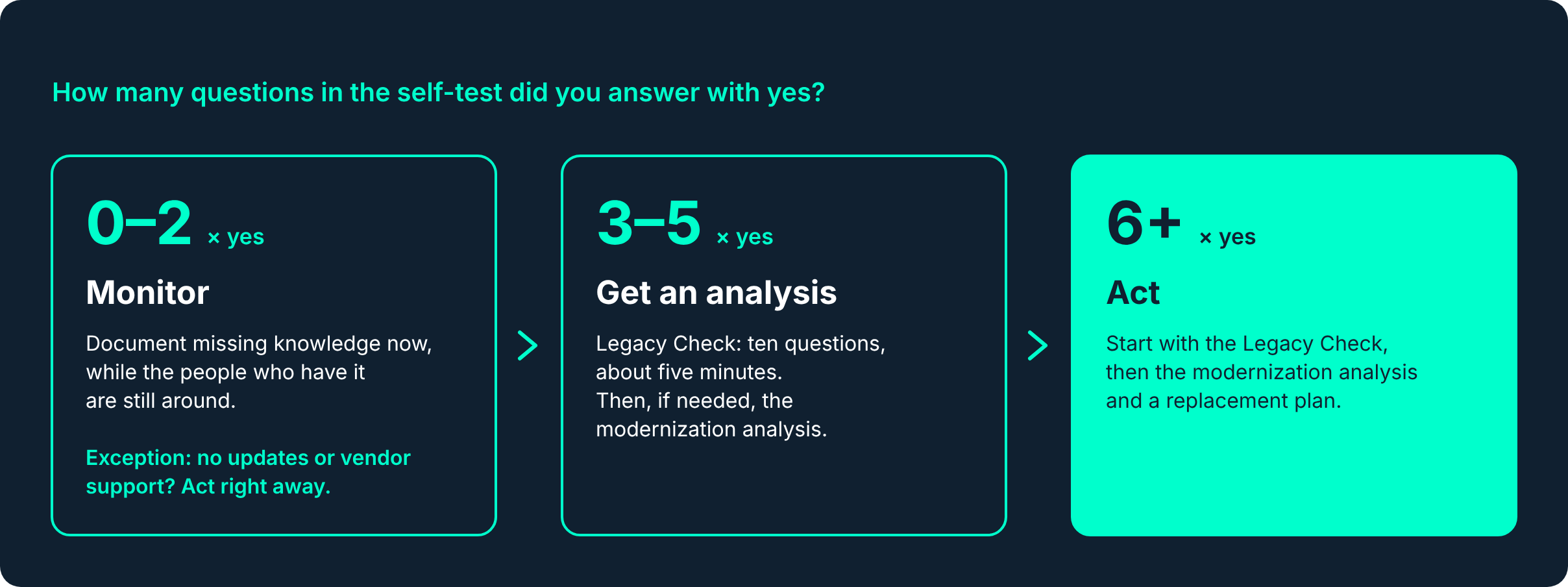
The number tells you how urgent the topic is for you:
- 0 to 2 yes answers: monitor. There is usually no acute need for action yet. Missing security updates are the exception: this one sign alone is reason enough to act. Otherwise, now is a good time to record missing knowledge while the people who have it are still around.
- 3 to 5 yes answers: get an analysis. Now a closer assessment makes sense, and that is exactly why we built the Legacy Check at Riwers. You answer ten questions, which takes about five minutes. You then see which prerequisites for a modernization are met and how much effort to expect, and if you like, we discuss the result in a free 30-minute call. The check is the first step; if needed, the modernization analysis follows.
- 6 or more yes answers: act. Several risks come together here. An analysis and a concrete plan for the replacement now belong on the agenda. Here, too, the first step is the Legacy Check, followed by the modernization analysis.
What you can do now
Depending on the result, different routes lead on. Not every modernization of a legacy system means a complete rebuild, and the routes are not mutually exclusive.
Document and keep running. If the system runs stably and it is mainly the knowledge that is thin, it already helps a lot to record interfaces, the data model and business rules. This makes you less dependent on individual people and gives you the foundation for every later step.
Modernize parts. Often the whole system does not have to be renewed at once. At Löwenfels, the interface consisted of a jQuery frontend with around 60 server-side RPC scripts. We rebuilt it in Angular, the document system behind it remained untouched, and it took a few weeks instead of several months. An ERP system can also be replaced step by step: the 30-year-old system from our project is being moved to Odoo module by module. We have a separate article on ERP for SMEs.
Replace. If you want to replace your legacy system completely, it is first about the strategy and the question of whether modernizing or redeveloping makes more sense. How AI helps with this and why the replacement can be combined with preparing for AI applications is described in our article on AI-powered legacy modernization.
Frequently asked questions
What does modernization cover?
Software modernization covers all measures that technically renew an existing application: refactoring, moving to a new platform, rebuilding on a current technology stack and replacing it with another solution.
What does not count as modernization?
Pure maintenance, updates and patches that touch neither the code nor the architecture are not modernization. They keep a system running but don’t change how it is built.
How can I tell that my software is outdated?
Typical warning signs are knowledge that only one person still has, missing documentation, missing vendor support, long lead times for changes and missing interfaces to new tools. If three or more of the ten signs in this article apply, a closer analysis is worthwhile.
When is it worth replacing a legacy system?
When several warning signs come together. From six of the ten signs onwards, we recommend tackling an analysis and a plan for the replacement. With three to five signs, the Legacy Check helps you assess the situation more precisely.
Conclusion: back to the warehouse
The two pallets from Monday morning will probably turn up again, at the latest when the colleague is back from holiday. The question behind it remains open: how much of your business depends on a system that only a few people still understand? The ten warning signs help you assess this before an annoying Monday turns into a serious problem. And as the Löwenfels example shows, software modernization doesn’t have to be a major project right away.
If you answered yes to three or more questions, the Legacy Check is the next step. You can find out more about our approach on the legacy migration page.